
Download SSuite NetSurfer Browser – Fast, Secure & Private Web Surfing
Overview of SSuite NetSurfer Browser
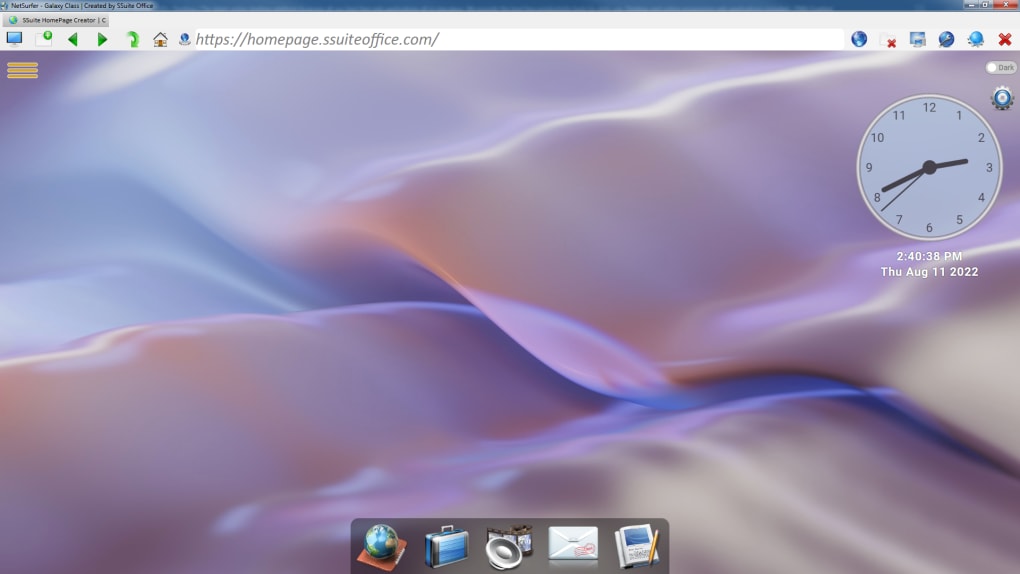
SSuite NetSurfer is a lightweight, free web browser that puts speed and privacy at the forefront of everyday browsing. Built on Microsoft Edge’s WebView2 runtime, NetSurfer delivers the performance of a modern Chromium‑based engine while remaining completely offline – the browser’s core never runs in the cloud. The user‑interface follows a classic tab‑based layout, offering a digital clock on the home page, one‑click access to favourite sites, and a toolbox dock that mirrors the macOS dock for quick launching of SSuite utilities.
What truly sets NetSurfer apart is its built‑in visual security indicator: each URL is colour‑coded to show the encryption level and whether the page is free of tracking scripts. Private browsing mode blocks social media trackers, third‑party cookies, and fingerprinting attempts, making NetSurfer a compelling alternative to mainstream browsers that monetize user data. With automatic updates, no homepage ads, and a focus on minimal system resource consumption, SSuite NetSurfer is ideal for users who demand a fast, secure, and ad‑free browsing experience on Windows machines.
Key Features & Security Highlights
Feature List
- Chromium‑based performance via Microsoft Edge WebView2 runtime.
- Colour‑coded security status bar that visualizes HTTPS encryption and tracking protection.
- Private browsing mode with automatic blocking of social media trackers and third‑party cookies.
- Tab‑based interface supporting unlimited open tabs with smooth switching.
- Integrated digital clock and one‑click favourite shortcuts on the homepage.
- Toolbox dock for rapid access to SSuite utilities (password manager, file shredder, etc.).
- Automatic, silent updates ensuring you always run the latest security patches.
- No homepage advertisements or unwanted promotions.
- Full‑screen, zoom, print, and file‑save options built into the navigation bar.
- Cross‑origin resource sharing (CORS) protection to stop malicious scripts from leaking data.
Security & Privacy Mechanics
Every page you visit in NetSurfer is evaluated by a lightweight engine that checks TLS certificate validity, HSTS headers, and known tracker signatures. The result appears as a coloured badge next to the address bar: green for fully encrypted sites, amber for mixed content, and red for unsecured or suspicious pages. This visual cue removes the guesswork that most browsers force users to endure. In private mode, NetSurfer also clears session cookies and local storage on exit, ensuring that browsing habit data never persists beyond the session. Unlike many free browsers that sell data to advertising networks, SSuite NetSurfer does not collect telemetry or usage statistics, aligning with privacy‑first philosophies.
Performance Advantages
Because NetSurfer leverages the WebView2 control, it inherits Edge’s multi‑process architecture, sandboxing each tab for stability and security. Memory consumption is kept low through aggressive garbage collection and by disabling unnecessary background services that are present in mainstream browsers. Users on older hardware often report faster page load times and smoother scrolling compared with Chrome or Firefox, especially when multiple tabs are open. The browser also supports hardware acceleration for video playback, making streaming a seamless experience without sacrificing battery life on laptops.
Installation, Usage Instructions & Compatibility
Step‑by‑Step Installation
- Visit the official SSuite website and click the “Download NetSurfer” button.
- The installer (NetSurferSetup.exe) will begin downloading – it’s under 30 MB.
- Run the installer and follow the on‑screen prompts. The wizard checks for the WebView2 runtime; if missing, it offers to install it automatically.
- Choose your preferred installation folder (default is
C:\Program Files\SSuite\NetSurfer). - Optionally create a desktop shortcut and enable “Launch at startup” for instant access.
- Click “Finish” – NetSurfer will open automatically, presenting the clock‑fronted home screen.
Getting Started with the Interface
Upon first launch, the home page greets you with a clean digital clock, a row of favourite icons, and a dock‑style toolbox at the bottom. To open a new tab, click the plus (+) icon next to the last open tab or press Ctrl+T. The address bar is located at the top, accompanied by refresh, home, and back/forward navigation buttons. Right‑click any tab to pin it, mute audio, or move it to a new window. The security badge sits directly left of the address bar, changing colour as you navigate different sites.
Private browsing can be launched by clicking the mask icon or using Ctrl+Shift+P. In this mode, the security badge stays visible, but all cookies and cache are stored in a temporary memory area that is erased when you close the window. For printing, click the printer icon or press Ctrl+P. NetSurfer supports PDF saving, page scaling, and custom margins.
Compatibility and System Requirements
SSuite NetSurfer is currently available for Windows 10, Windows 11, and Windows Server editions that support the WebView2 runtime. The minimum system specifications are:
- CPU: 1 GHz or faster, dual‑core.
- RAM: 2 GB (4 GB recommended for smooth multi‑tab performance).
- Disk Space: 150 MB free for installation and updates.
- Graphics: DirectX 9 compatible GPU for hardware acceleration.
Although NetSurfer runs on a Chromium base, it does not have native macOS, Android, or iOS builds at this time. However, the same privacy principles are applied in SSuite’s other products, and a future cross‑platform version is hinted at on the development roadmap.
Pros, Cons & Frequently Asked Questions
Pros and Cons
- Pros:
- Fast, lightweight performance thanks to WebView2.
- Visual security indicator simplifies encryption awareness.
- Robust private mode with automatic tracker and cookie blocking.
- No ads, telemetry, or data‑selling practices.
- Automatic silent updates keep the browser secure.
- Intuitive tab‑based UI with a handy toolbox dock.
- Cons:
- Only available for Windows; no native macOS, Android, or iOS version yet.
- Limited extension ecosystem compared to Chrome/Firefox.
- Some advanced developer tools are hidden behind settings menus.
Frequently Asked Questions
Is SSuite NetSurfer completely free?
Yes, NetSurfer is 100 % free for personal use. There are no hidden subscription fees, and the application does not display any ads.
Does NetSurfer collect any user data?
No. The browser is designed with privacy in mind and does not send telemetry or browsing habit data back to SSuite or third‑party servers.
Can I import bookmarks from Chrome or Firefox?
Yes. NetSurfer includes an import wizard (Settings → Import) that can pull bookmarks, saved passwords, and browsing history from most major browsers.
How does the security colour‑code work?
The browser checks the TLS certificate, HSTS header, and known tracker signatures. Green means fully encrypted and tracker‑free, amber indicates mixed or partially encrypted content, and red flags unencrypted or suspicious pages.
Will NetSurfer run on low‑end PCs?
Because it disables many background services and uses a lightweight UI, NetSurfer runs comfortably on computers with as little as 2 GB RAM, though 4 GB is recommended for heavy multitasking.
Conclusion – Should You Download SSuite NetSurfer?
If you value a fast, lightweight browser that puts privacy first, SSuite NetSurfer is a compelling choice for Windows users. Its Chromium‑based engine ensures modern web compatibility, while the colour‑coded security bar gives you instant feedback about each site’s encryption status. The absence of ads, telemetry, and data‑selling practices makes it stand out from many free browsers that monetize user behaviour. Although it lacks a native macOS or mobile version and an extensive extension marketplace, the core feature set—private mode, automatic updates, and a clean tab‑based UI—covers the needs of most everyday internet activities. Download SSuite NetSurfer today to experience a secure, speedy browsing environment that respects your digital footprint.







